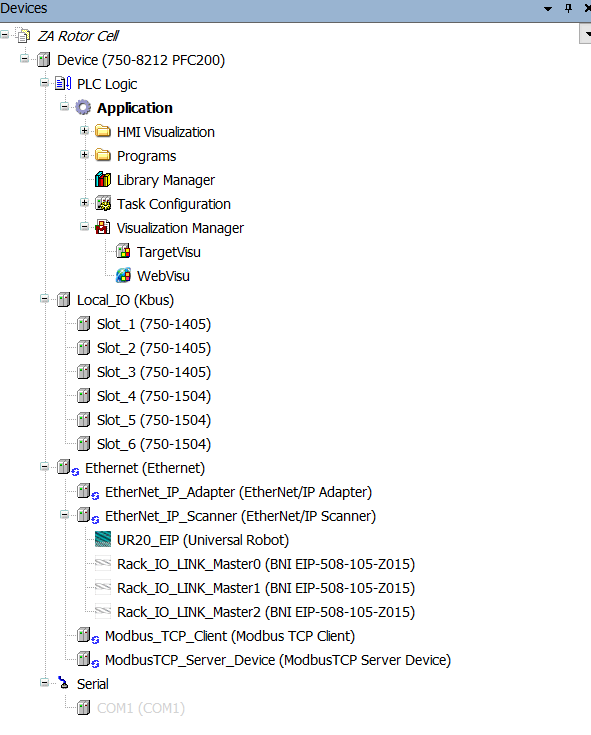
I am no expert at this (first time codesys/wago programmer), but strong enough to get to where I am at in the project. I am needing to poll a Haas CNC machine via http GET requests (MTConnect) while also communicating with other ethernet protocols across the cell (EIP, Modbus TCP). I am running FW29 on the PFC and programming with codesys V3.5 sp21. I have tried using FbHTTP_Get (from WagoAppHTTP, 1.7.3.5), though I think my issue is in setting up the Ethernet device for TCP/IP in addition to being a EIP scanner, EIP agent, Modbus Client, and Modbus Server.
In trying to use our good ole friend at the GPT’s, I keep getting directed to add TCP/IP under the Ethernet Device in my tree. However, the only options I see are fieldbus related (EIP, Modbus, PROFINET). My PRG is set as Freewheeling and is reliant on the data that gets returned and parsed from the GET each cycle (hence why I am trying to make it synchronous). Anyone have any tips or guidance you can provide me?
You shouldn’t need to add anything to the Project Tree for the WagoAppHTTP library to work. If you are using HTTP and not HTTPS, make sure you have enabled it via the Web-Based Management page (default for HTTP is disabled).
If the FbHTTP_Get operation is not completing and xError turns True, take a look at the oStatus output - the Description field in there is often helpful.
Thank you very much for your response! Being a new member it won’t let me upload more than one image in the post. I just set up port mirroring and did a packet capture to see the packet is being sent correctly, and the server is responding to the plc. I am just not capturing it on the plc side apparently. Here is my code attempt below
//——————————————————
PROGRAM PRG_Haas1

VAR
    MTC : FB_MTC_Handler;
END_VAR

MTC(machine := 1)
MTC.GetResponse(); // trying to store response in Global Variable (GVL_Haas1.MTC_Response)
METHOD GetResponse : Bool

VAR

END_VAR

// ==========================
// Select Machine Parameters
// ==========================
CASE machine OF
    1:
        sURI := CONCAT(CONCAT('http://', GVL_Networking.Haas1_IP), ':8082/current');
        GVL_Haas1.MTC_Connected := FALSE;
        GVL_Haas1.MTC_Response := '';
    2:
        sURI := CONCAT(CONCAT('http://', GVL_Networking.Haas2_IP), ':8082/current');
        GVL_Haas2.MTC_Connected := FALSE;
        GVL_Haas2.MTC_Response := '';
END_CASE;

// ==========================
// Perform up to 3 retries
// ==========================
bSuccess := FALSE;

FOR iRetry := 1 TO 3 DO
    fbGet.sUri := sURI;
    IF machine = 1 THEN
        fbGet.pRxBuffer := ADR(GVL_Haas1.MTC_Response);
    ELSE
        fbGet.pRxBuffer := ADR(GVL_Haas2.MTC_Response);
    END_IF
    fbGet.tTimeout := tTimeOut;

    // --- Trigger request ---
    xTrigger := TRUE;
    fbGet(xTrigger := xTrigger, xBusy => bBusy, xError => bError);
    xTrigger := FALSE;

    // --- Wait for completion (blocking) ---
    tStart := TIME();
    REPEAT
        fbGet(xTrigger := xTrigger, xBusy => bBusy, xError => bError);
        IF bError THEN
            EXIT;
        END_IF

        IF bBusy = FALSE THEN
            IF machine = 1 THEN
                IF LEN(GVL_Haas1.MTC_Response) > 100 THEN
                    GVL_Haas1.MTC_Connected := TRUE;
                    bSuccess := TRUE;
                    EXIT;
                END_IF
            ELSE
                IF LEN(GVL_Haas2.MTC_Response) > 100 THEN
                    GVL_Haas2.MTC_Connected := TRUE;
                    bSuccess := TRUE;
                    EXIT;
                END_IF
            END_IF
        END_IF
    UNTIL (TIME() - tStart) > tTimeOut
    END_REPEAT;

    // --- If success, break ---
    IF bSuccess THEN
        EXIT;
    END_IF

    // --- 200ms delay before retry ---
    tDelay(IN := TRUE, PT := T#200MS);
    WHILE tDelay.Q DO
        // Wait 200ms before retry
    END_WHILE;


END_FOR

// ==========================
// Finalize connection result
// ==========================
IF bSuccess = FALSE THEN
    IF machine = 1 THEN
        GVL_Haas1.MTC_Response := '';
    ELSE
        GVL_Haas2.MTC_Response := '';
    END_IF
END_IF
FUNCTION_BLOCK FB_MTC_Handler

VAR_INPUT
    machine : INT;
END_VAR

VAR
    fbGet   : FbHTTP_Get;         // FB instance
    bBusy   : BOOL;
    bError  : BOOL;
    tDelay  : TON;

    tTimeOut     : TIME := T#5S;
    tStart       : TIME;
    iRetry       : INT;
    sURI         : STRING(255);
    bSuccess     : BOOL;
    xTrigger     : BOOL;

END_VAR

IF machine <> 1 AND machine <> 2 THEN
    // set an error flag
END_IF
UPDATE….The issue was that I was not setting the input for buffer size (udiRxBufferSize). Now I am seeing the bytes being stored.
I set the pRxBuffer to an array[0..60000] named ‘arrRxBuffer’ and added this line call for setting the buffer size. Here is the code that worked.
FOR iRetry := 1 TO 3 DO
    fbGet.sUri := sURI;
    fbGet.pRxBuffer := ADR(arrRxBuffer[0]);
	fbGet.udiRxBufferSize := SIZEOF(arrRxBuffer);
    fbGet.tTimeout := tTimeOut;