Greetings all.
I am not an expert in Keeping up with IT as it has developed over the years but a pretty decent troubleshooting technician. I recently was exposed to My first Wago PLC, a 750-852 in a piece of equipment, and would like to ability to connect and monitor as this application has no HMI. I am unable to ping or connect with I/O check to the PLC. I have disabled the firewall on the laptop, use a program called Netset man to adjust from dynamic to static Network settings. I feel something in My PC network settings is incorrect as I tried on both a desktop and laptop. Is there a more detailed network setup tutorial I could find as this is where I am weak. I do not know the controller IP address, tried a default address and do not see a reset button. I also slid the switch on plc to mid position to stop application but still no luck.
Hello,
Depending on the LED status and what tool you have there are mainly 2 solutions :
Solution 1 /
Do you have a USB configuration cable 750-923 ?
If yes, connect it to the service interface (where RUN/STOP selector is) and use WAGO Ethernet Settings to read and adapt the configuration.
Make sure the IP address is inside your network. For example you have an IP in 192.168.1.X, make sure the network IP is 192.168.1.Y (where Y is >=1 and <255). 2 devices shouldn’t have the same IP address of course. The subnet mask is 255.255.255.0
Solution 2 /
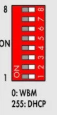
If there is a DHCP server on your network I would suggest to place all the DIP switches of the 750-852 to ON, and to reboot the controller. It should grab an IP address within your network.
You can then use WAGO Ethernet Settings to scan the network and find it.
Here is the complete manual for 750-852 :
Thanks very much for Your reply. I did just order the USB service cable so when it arrives I will try that out. I also will try again with Your recommendations on the DIP switch settings.
As soon as I can test again I will update here the progress.
Well as an update on this subject here is what has happened.
The suggestion to put it in DHCP mode worked where I was then able to see the address on a router.
Once I put in the correct IP range I was able to connect to the Wago 750 unit.
I have also ordered a Wago USB interface cable to simplify things in the future.
Thanks for You assistance!
BK